

Google Business Profile for tradespeople: 10 optimisations to get more local enquiries
10 practical tips to improve your Google Business Profile as a tradesperson and attract more qualified local enquiries for your business.

Sur cette page8 sections
For a tradesperson, a Google Business Profile is often the first point of contact with a future customer. It can appear in Google Search and on Google Maps, even before someone visits your website. It is a crucial tool: it can drive phone calls and show your customers that you are open. If the phone number is no longer valid or the opening hours are wrong, enquiries can stop abruptly due to a loss of credibility.
The good news is that you don't need to post every day or stuff your profile with keywords. To optimise a Google Business Profile for a tradesperson, the main goal is to represent your business accurately, explain what you do, make contact easy, and keep your details up to date. Here are ten practical checks to carry out, in order.
Before you start: a complete profile doesn't guarantee the top spot
Google explains that local results depend mainly on relevance, distance, and prominence. It is therefore not possible to pay for a permanently better local position. Google may offer temporary promotion options, but these are no substitute for an accurate and useful profile that helps Google understand your business and show you to customers who actually need you.
This is primarily what the Google profile is for: answering your customers' questions — who are you, what do you offer, where do you work, and how can they reach you?
1 to 3: Securing the fundamentals
1. Claim the right profile and stay in control
Start by searching for your business on Google and Maps. A profile might already exist, created from public sources or previous management. If so, claim it instead of creating a duplicate. If no profile matches your business, create one from your business account and follow Google's verification process.
This step is more important than it looks. An unmanaged profile can keep an old phone number, an obsolete business name, or hours that no one checks. Also check that the people managing the profile have the right access level and that the business can recover the account if a service provider changes.
2. Use your real business name
The displayed name must match the name used in real life: signage, business documents, website, and customer interactions. Do not add a list of towns or services to try and gain visibility. "Martin Plumbing — plumber London emergency leak cheap" looks more like a DIY advert than a professional identity.
A consistent name builds trust and limits corrections or suspensions related to inaccurate representation. If your business evolves, update the name everywhere in a coordinated way rather than keeping several variations across different platforms.
3. Choose the category that truly describes your trade
The primary category gives Google an important signal about the business's activity. Choose the most specific category that matches your actual trade, not the one that seems to have the most searches. A category that is too broad attracts people who aren't looking for your service; an invented category makes the profile look untrustworthy.
If in doubt about the primary category to use, you can look at those of your direct competitors, without automatically copying them. The wrong primary category can lead to irrelevant highlights.
Where the interface allows and it matches your services, add up to three relevant secondary categories. These should complement the main activity, not turn the profile into a catalogue of every possible trade. Then re-read the description and services: the whole thing should tell the story of the same business.
4 to 6: Making local information useful
4. Provide a realistic address or service area
A tradesperson doesn't always receive customers at a premises. If you actually welcome the public at an address, enter that address and indicate your service area if you also travel. If you work at your customers' locations without receiving visitors at your address, use the settings designed for service-area businesses and do not display an address as if it were open to the public.
The service area must correspond to the travel you actually accept. Do not try to extend it beyond what you can realistically cover. If your area is particularly complex, indicate a sector you can serve with consistent lead times and costs, then list the main towns on your website to remove any doubt.
Above all, avoid creating a separate profile for every town you visit: these multiple profiles risk creating duplicates and scattering information. One profile per real location and an honest service area is cleaner than a collection of duplicates.
To learn more about mobile businesses, see our article on local SEO for tradespeople or freelancers.
5. Keep hours, phone number, and website up to date
Practical information is often the real trigger for an enquiry. Check the phone number, website link, regular hours, and holiday hours. If you close for the holidays, change your availability, or work by appointment only, indicate this in the designated fields rather than letting the customer guess.
Test the number from a mobile phone. Also open the website link in private browsing and check that it leads to a clear, fast-loading page that matches the service advertised. A visible profile is useful; a profile that sends people to a confusing page is much less so.
Note: if you have entrusted the management of your Google profile to a third party, check that no extra buttons have appeared unless the proposed action is still valid. Some platforms add and maintain a booking button themselves. If this service is no longer wanted, contact the support of the platform concerned and check the management options available in your profile.
6. Detail services using clear language
The services section allows you to specify what you actually do. Describe services using your customers' vocabulary: "leak detection", "bathroom renovation", "boiler service", or "fuse box installation" are more useful than a string of generic terms like "quality", "expert", and "professional".
For each important service, briefly explain what is included, the situations you handle, and what action the customer can take. Don't invent a service just because it seems popular. A misdirected enquiry wastes your time and degrades the experience from the very first interaction.
The idea is to start from the customer's point of view: they won't necessarily search for generic terms, but for a way to meet a specific need. Use everyday words rather than technical jargon that might not be helpful.
7 and 8: Explaining and showing the work
7. Write a description that answers the customer's questions
Your description should allow people to quickly understand your trade, your area, and how you work. It can specify the type of clients you work with, your main services, and the local context. Write for a person who doesn't know your business, not for a robot you want to repeat the word "tradesman" twenty times.
Avoid keyword stuffing, unprovable promises, and information that quickly becomes outdated. A simple description like "Independent electrician in London, providing safety checks, renovations, and new electrical installations for homeowners and small businesses" is more informative than a slogan full of technical terms.
Re-read the description after every change in your offering. It must not contradict the categories, services, website, or information displayed on your other profiles.
8. Add real photos showing your trade
Photos allow the customer to visualise your work. Show your workshop, equipment, completed projects, professional vehicle, or the stages of a job when privacy and safety allow. A real, well-framed photo is generally more useful than a generic stock image that could represent any business.
Prioritise sharp, recent images that are consistent with your services. Add a caption or context where the field is available, without turning the photo into a paragraph of keywords. Do not publish an image of a job site or a customer without the necessary permissions.
The profile doesn't need to be a content factory. A few representative images, updated as the business evolves, are better than an album full of duplicates.

9 and 10: Building trust and measuring what happens
9. Get honest reviews and respond to them
Reviews give future customers a glimpse into the experience. Ask for a review after a real service, with a simple link or instruction. Let the person choose freely what they want to write. Do not offer gifts or discounts in exchange for a review: this practice is against review guidelines and can permanently damage trust. Ask for feedback from all your customers, not just those you think are satisfied.
Respond to reviews with the same tone as your professional interactions: thank the person, mention a specific detail, and remain discreet if a topic involves personal information. For a negative review, stay calm, try to understand the problem, and indicate the efforts made to improve the experience; do not publish details about the job or contract, and offer to continue the conversation via a private channel when necessary.
A review is not an advert to be manufactured. It is customer feedback to be taken seriously. Fake reviews or visibility exchanges can undermine the very trust you are trying to build.
Practical example — Asking for a review without pressure
After a job, send a simple link and ask for honest feedback, preferably when the customer can consider the entire service. You can send a reminder if they forget, without pressure and without only selecting satisfied customers.
10. Measure actions and improve the journey after the click
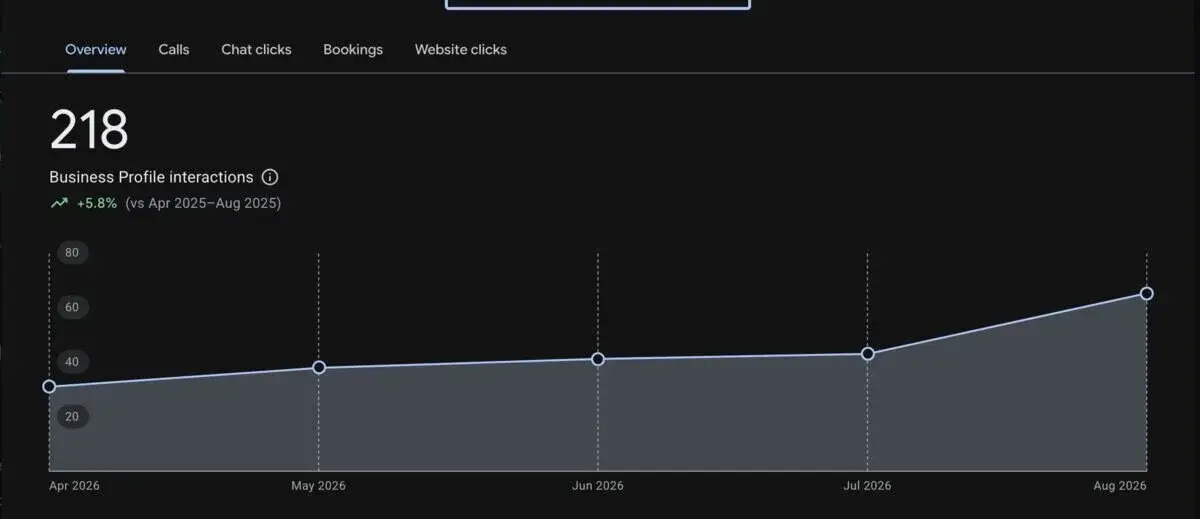
A profile can be viewed without generating an enquiry, and an enquiry can arrive after several touchpoints. Use the performance metrics provided in your profile, where available, to monitor searches, views, and actions such as calls, website clicks, or direction requests. Metrics and their availability may vary depending on the type of profile and the interface used.
Don't just look at a single figure. Note the periods, the services highlighted, and the enquiries actually received. If many people call for a service you no longer offer, correct the category, services, description, and linked page. If website clicks are increasing but forms remain empty, examine the landing page on mobile.
The journey must be consistent: the profile promises a service, the website explains it, the phone works, and someone answers within a reasonable timeframe. You can also simply ask your customers how they found you. This information complements the dashboards, especially when calls or word-of-mouth escape measurement.
The Google profile is not a replacement for your website
The profile answers the initial questions: who are you, where are you, when can you be reached, and what service do you offer? The website must then provide the proof and details that help people choose you: service pages, completed projects, service area, working methods, FAQs, and a clear contact form.
To explore the subject further, you can consult our guide on local SEO for tradespeople. It covers the synergy between the profile, website, content, reviews, and tracking. You can also see how a web project designed for a local business or a content project based on concrete achievements can extend the profile.
The profile link should therefore point to the most useful page for the stated intent. If you are highlighting bathroom renovations, don't automatically link to a homepage that forces the visitor to search for the information.
Express monthly checklist
- The displayed name matches the one used in real life.
- The primary category describes your priority activity.
- The address or service area reflects your travel conditions.
- The phone, website, and hours have been tested recently.
- The services offered match what you still accept.
- Photos show your activity and do not contain confidential information.
- New reviews receive a professional response.
- Enquiries received match the area and services advertised.
This review doesn't take long, but it prevents old information from working against you for months. Schedule it after a major change: a move, new number, new offering, temporary closure, or modification of your service area.
Conclusion: A good profile makes your business easier to choose
Optimising a Google Business Profile for a tradesperson isn't about stacking keywords or posting artificial updates. It's about presenting a real business with the right markers: an accurate name, a consistent category, an honest area, reliable hours, clear services, useful photos, and properly obtained reviews.
The profile attracts local attention. Your website, your work, and your responsiveness then turn that attention into trust. By tracking truly useful actions — calls, clicks, quote requests, and qualified leads — you can improve your presence without getting lost in a complicated dashboard.
If you want to review the consistency of your profile and website, contact Cadarsir to discuss your online presence.
Official sources consulted
- Google — How to improve your local ranking on Google.
- Google — Add or claim your Business Profile.
- Google — Guidelines for representing your business on Google.
- Google — Manage your service area.
- Google — Tips for getting more reviews.
- Google — Understand your Business Profile performance.
Platform features and guidelines may evolve. Check the rules applicable at the time you modify your profile.